Installation
AP | Wraps is a Blender extension. It needs Blender 4.5 or newer.
Install from a .zip file
- Download the
.zipfile of the extension. Do not unpack it. - In Blender, open Edit › Preferences and go to the Add-ons tab.
- Open the drop-down menu in the top right corner and choose Install from Disk....
- Select the downloaded
.zipfile and click Install from Disk. - Make sure the checkbox next to AP | Wraps is on.
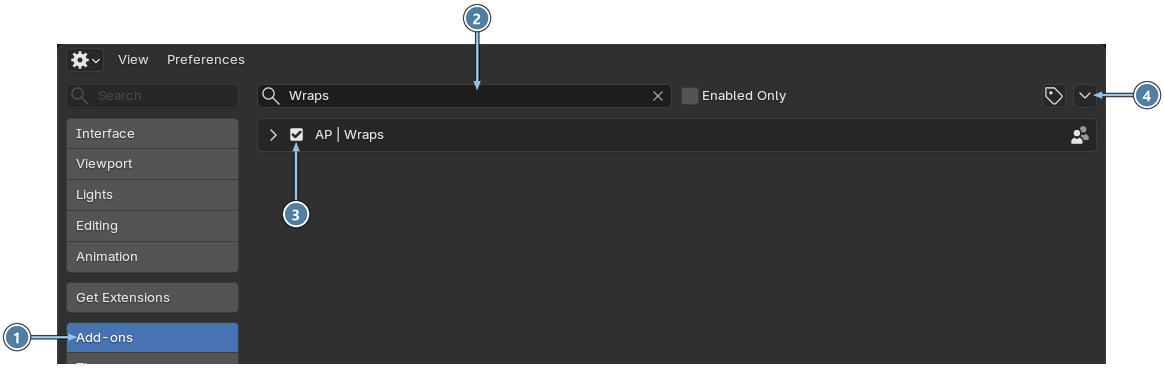
- Add-ons tab.
- Search field. Type
Wrapsto find the add-on quickly. - Enable checkbox of AP | Wraps.
- Drop-down menu with Install from Disk....
Tip
You can also drag the .zip file from your file explorer and drop it onto the Blender window.
After installing, press N in the 3D View to show the sidebar and open the Wraps tab. Then follow the Quick Start.
Update to a new version
Install the new .zip file the same way. Blender replaces the old version. Your presets and preferences are kept.
Uninstall
- Open Edit › Preferences and go to the Get Extensions tab.
- Find AP | Wraps in the Installed list.
- Open the drop-down menu at the right end of its row and choose Uninstall.
Your presets
If your presets are in the default folder, Blender deletes them together with the add-on. To keep them, copy the preset folder somewhere safe before you uninstall. See Preset Library Folder.