Preferences
Open Edit › Preferences › Add-ons, find AP | Wraps and expand it. You can also click the Preferences button (gear icon) at the top of the Wraps panel.
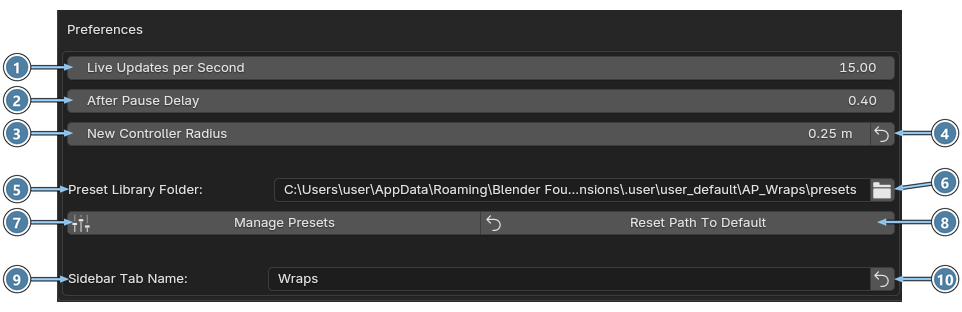
- Live Updates per Second. The highest number of updates per second in Live mode.
- After Pause Delay. How long to wait in After Pause mode.
- New Controller Radius. The size of the ring of a new wrap.
- Reset To Default. Restores the default radius.
- Preset Library Folder. Where your presets are stored.
- Folder button. Chooses another folder.
- Manage Presets. Opens the preset manager.
- Reset Path To Default. Goes back to the default preset folder.
- Sidebar Tab Name. The sidebar tab that shows the panel.
- Reset To Default. Restores the default tab name.
Live Updates per Second
The highest number of times per second that wraps are rebuilt in Live mode. Default: 15. Lower it if live updates make the viewport slow. It is a limit, not a promise: heavy wraps may update less often.
After Pause Delay
How long wraps wait after you stop editing before they update in After Pause mode. Default: 0.4 seconds. Make it longer if wraps start updating while you are still working.
New Controller Radius
The radius of the ring that Create Wrap makes. Default: 0.25 m. Set it to the scale of your scenes, smaller for small props and larger for big objects, so new rings catch what you want right away. The arrow button on the right restores the default.
Preset Library Folder
The folder of your presets. By default it is the extension's user data folder. It is kept when you update the add-on, but Blender deletes it when you uninstall the add-on.
To keep your presets safe, click the folder button and choose your own folder. It can be any folder on your computer, a shared network folder or a cloud drive. Your presets are not moved to the new folder automatically. Copy them there yourself in File Explorer or Finder.
Reset Path To Default switches back to the default folder.
Sidebar Tab Name
The name of the 3D View sidebar tab that shows AP | Wraps. Default: Wraps. The arrow button on the right restores the default.
Info
If the name matches an existing tab, such as Item or another add-on's tab, AP | Wraps is added to that tab as one more panel.