Material & UV
Wraps come out ready for texturing. The Material & UV section assigns a material and creates UVs that follow the wrap. It is collapsed at first. Click its header to expand it.
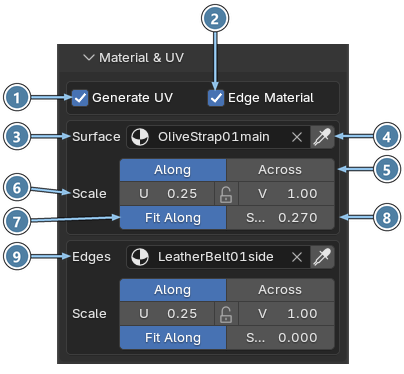
- Generate UV. Creates UVs that follow the wrap. The UV settings below work only while it is on.
- Edge Material. Straps only. Uses a separate material and UVs on the strap edges. A second block, Edges, appears.
- Material. The material of the wrap. With Edge Material on, this block is called Surface and sets the top and bottom of the strap.
- Pick Material. The eyedropper. Click any object or wrap in the viewport to use its material. It goes to all selected wraps.
- Along / Across. The direction of the texture: along the wrap or across it.
- Scale U and V. How often the texture repeats. The lock between them scales U and V together.
- Fit Along. Stretches the texture slightly so there is no seam where the wrap closes.
- Shift. Moves the texture along the wrap.
- Edges. The material and UVs of the strap edges. They work the same way as the surface ones.
Tips
- The material and UV settings are part of a preset, so a saved look includes its textures.
- When several wraps are selected, picking a material with the eyedropper sets it on all of them.
- Without Generate UV, the wrap gets no UV coordinates. Turn it on before you use image textures.