Interface Overview
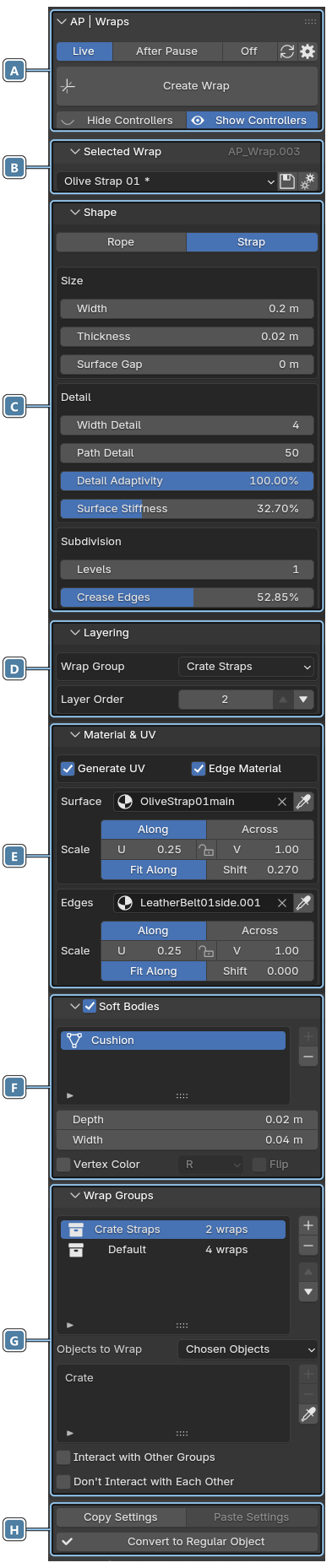
AP | Wraps lives in the Wraps tab of the 3D View sidebar. Press N to show the sidebar. The panel is split into sections, and the sections can be expanded or collapsed by clicking their headers.
The Selected Wrap sections appear only while a wrap is selected. When several wraps are selected, a change applies to all of them.
- Main panel. Update mode, Create Wrap, and Hide or Show Controllers. See Updates and Controllers.
- Selected Wrap. The name of the selected wrap and its preset. See Presets.
- Shape. Rope or strap, size, detail and subdivision. See Shape.
- Layering. Wrap group, layer order and weave. See Layering and Weave.
- Material & UV. Materials and texture coordinates. It is collapsed at first. See Material & UV.
- Soft Bodies. Objects that wraps press into. See Soft Bodies.
- Wrap Groups. What each group of wraps goes around. See Wrap Groups.
- Wrap actions. Copy and paste settings, convert to regular objects. See Copy, Paste and Convert.
Tip
Hover over any button to see a tooltip that explains what it does. Dimmed buttons tell you in the tooltip why they can't be used right now.